Image for Temporary Email That Supports Attachments


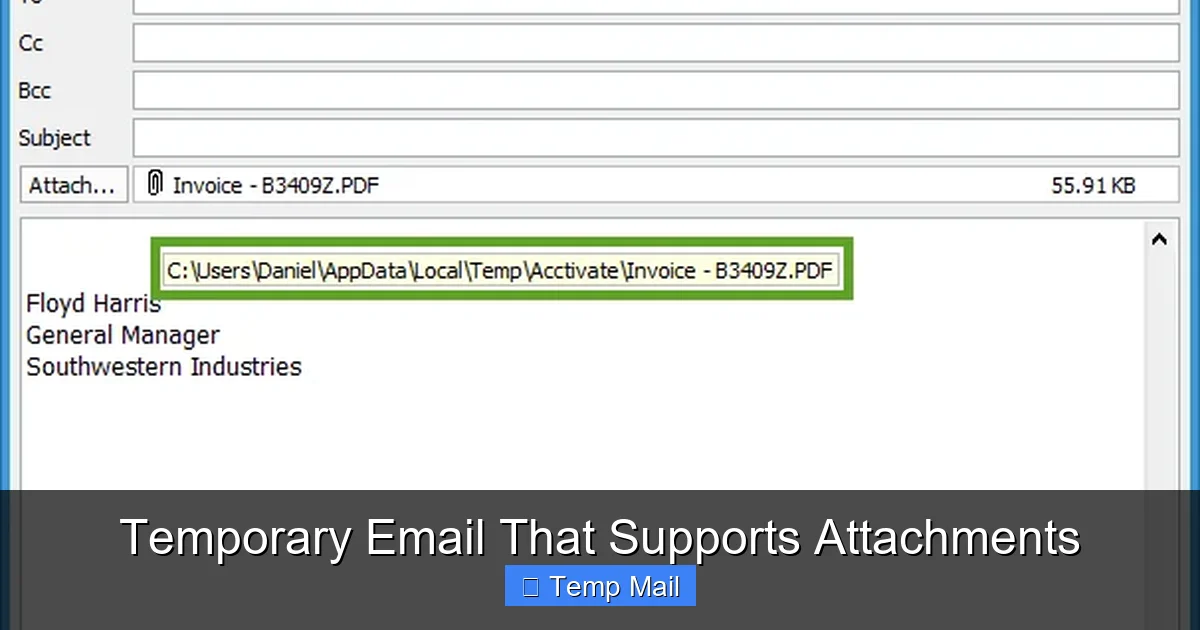
Temporary email services that support attachments bridge a critical gap in online privacy and convenience. They allow you to send and receive files like PDFs, images, or documents without using your primary email, protecting your identity and inbox from spam. However, not all disposable email providers offer this feature, and those that do often impose strict file size limits and security considerations. Choosing the right service means understanding its attachment policies, encryption standards, and auto-deletion timelines to ensure your file transfers are both functional and safe.
Let’s be honest: the internet can feel like a relentless data-harvesting machine. Every time you sign up for a new app, download a free ebook, or access a gated whitepaper, you’re asked for an email address. Hand over your primary Gmail or Outlook account, and you’ve just opened the floodgates to a tidal wave of promotional newsletters, “special offers,” and potential data breaches. This is where temporary email services become your digital shield. But what happens when that free trial software, that sample contract, or that high-resolution stock photo needs to be sent to you? A disposable inbox that only handles text is useless. That’s why the holy grail of privacy tools is a temporary email that supports attachments. It’s the missing piece that allows for true, practical anonymity in a world where communication increasingly involves files.
This isn’t just about avoiding spam; it’s about controlling your digital footprint. Imagine you’re a freelancer applying for a one-off gig on a platform you’ve never used. They want a portfolio PDF. Do you send it from your personal email, linking your identity to a platform you may never touch again? Or do you use a burner email with attachment support, complete the transaction, and let the entire digital trail vanish into the ether? The latter is smarter, safer, and gives you peace of mind. However, navigating this world requires knowledge. Not all services are created equal, and the feature you need—file handling—comes with its own set of rules, limits, and warnings. This guide will walk you through everything, from how it works to which services to trust and, most importantly, how to use this powerful tool wisely.
At its core, a temporary email that supports attachments functions like any other web-based email service, but with a drastically shortened lifespan and simplified architecture. When you visit a provider’s website, it instantly generates a random email address for you (e.g., [email protected]). This address is tied to a temporary inbox stored on the provider’s servers. The “supports attachments” part means the server infrastructure is configured to handle Multipurpose Internet Mail Extensions (MIME) data—the standard for email attachments.
Visual guide about Temporary Email That Supports Attachments
Image source: thumb.modcdn.io
When someone sends a file to your disposable address, the server accepts the incoming data, stores the file in a temporary cache linked to your session, and renders a download link or preview within the web interface. For outgoing attachments, the process is similar: you upload a file from your device, the server temporarily hosts it, and it’s encoded and sent as part of the email payload to the recipient. The critical difference from permanent email is the auto-deletion mechanism. After a predetermined time—be it 10 minutes, 1 hour, or 24 hours—the server purges the entire inbox, including all stored files and their metadata. There is no “Sent” folder archive. It’s designed to be a single-use, self-destructing message.
You might wonder why a seemingly simple feature like attachment support isn’t universal among disposable email services. The answer boils down to cost, abuse potential, and complexity. Storing and transferring files consumes significantly more server bandwidth and storage than plain text emails. For a free service funded by ads, this is an expensive feature to offer at scale. More importantly, file attachments are the primary vector for malware, viruses, and illegal content distribution. By limiting or removing attachment capability, a provider drastically reduces its risk of being used for cyberattacks or hosting pirated material, which could lead to legal trouble or server blacklisting.
Therefore, the services that do support attachments are often those with more robust infrastructure, clearer terms of service, and sometimes a premium tier. They implement security scans on uploaded files (though not foolproof) and enforce strict size limits. For you, the user, this means you must be extra diligent. The convenience comes with the responsibility to understand that you are using a shared, temporary resource. You cannot assume the same level of security or permanence as Google Drive or your corporate email system.
Not all temporary email with attachments services are equal. Below is a practical comparison of popular providers that offer this functionality, focusing on their key file-handling specs. Remember, these details can change, so always double-check the current limits on the site itself.
Visual guide about Temporary Email That Supports Attachments
Image source: blog.freedcamp.com
Practical Tip: When testing a service, first send a small test file (like a 1MB text document) to yourself from another email account. This verifies the attachment pipeline works before you rely on it for something important. Check if the download link is direct or if you have to navigate through multiple pages.
Many of these services offer “Pro” or “Premium” subscriptions. Is it worth your money? Consider a paid plan if you frequently need larger file limits (e.g., 50MB vs. 10MB), longer inbox durations (24-72 hours vs. 1 hour), or an ad-free experience. For the occasional user who just needs to send a PDF once a month, the free tier is perfectly adequate. For a freelancer or researcher who regularly exchanges sample files or data sets, a $3-$5/month premium plan can be a worthwhile investment for the increased utility and reliability. Always calculate the value based on your specific use case frequency and file size needs.
This is the most critical section. You must understand that a temporary email is primarily an anonymity tool, not a high-security vault. Most reputable providers use HTTPS (SSL/TLS) for the connection between your browser and their server. This encrypts the data in transit, preventing eavesdroppers on your local network or ISP from seeing the file. However, end-to-end encryption (E2EE)—where the file is encrypted on your device before upload and can only be decrypted by the recipient’s private key—is exceptionally rare in the disposable email space. The provider holds the decryption keys on their server, meaning a malicious insider, a server breach, or a government subpoena could potentially expose your file’s contents.

Visual guide about Temporary Email That Supports Attachments
Image source: as2.ftcdn.net
Furthermore, many free services scan attachments for viruses using basic, signature-based tools. This is good for stopping known malware but does nothing for privacy. The scanned file may be stored in a quarantine area briefly. Assume that while your file is on the provider’s server, it is at rest with whatever default server-side encryption they employ (if any), which is not as robust as dedicated cloud storage encryption.
Given these limitations, there is a definitive list of files you should never send via temporary email that supports attachments:
The rule of thumb is: if the file would cause you significant harm, financial loss, or legal trouble if it were publicly leaked, it does not belong in a disposable inbox. Use encrypted cloud storage with proper access controls (like Proton Drive or Tresorit) for those items.
You want to try a piece of software that requires registration and sends a license key or download link via email. You have zero interest in their newsletter or future marketing. Use your temporary email. Download the installer (if under the size limit), get the key, install and test the software. The temp inbox dies, and the company has no valid email to add to their spam list. This is a quintessential, low-risk use case.
You’re participating in a forum or a crowdsourced project where someone needs a specific file from you—a photo for a location-based challenge, a sample data file for debugging, or a template for a community project. You want to contribute but don’t want to link the file to your real identity. Create a temp address, send the file, and let it expire. Your contribution is made, and your personal email remains private.
You’re exploring a new freelance platform or job board. They ask for a writing sample, portfolio PDF, or a small design mockup. Instead of uploading it to your permanent Google Drive and sharing that link (which can be tracked and persists forever), you can email it to the platform’s contact address from a disposable inbox. Once the platform has downloaded it (you should confirm receipt), the trail is gone. This is particularly useful for platforms you might not pursue further.
Sometimes, a file or resource is gated behind an email registration that blocks certain domains or countries. A temporary email from a reputable provider can sometimes bypass these simple checks, allowing you to access a freely offered resource (like a research paper or template) that is otherwise restricted. Always respect the publisher’s terms; this is for legitimate access to freely provided content, not for pirating paid content.
To use this tool effectively and safely, internalize these practices:
Even experienced users can fall into these traps:
The landscape of temporary email that supports attachments is in a constant arms race. As providers improve their offerings (larger limits, better UI), abusers also find new ways to exploit them for spam, phishing, and malware distribution. This leads to two trends: first, more and more popular disposable domains get blacklisted by major email providers like Gmail and Outlook. Your temp email might not even be accepted as a sender by some services. Second, providers are tightening verification. Some now require solving a CAPTCHA before generating an address or sending an email, which can deter automated abuse but also adds friction for legitimate users. The future likely holds more sophisticated, perhaps even blockchain-based, disposable systems that can prove legitimacy without personal data, but they are not mainstream yet.
It’s vital to frame this tool within an ethical context. Using a temporary email with attachments to protect your privacy from aggressive marketing is a smart, defensible act. Using it to send copyrighted material you don’t own, to distribute malware, to harass someone anonymously, or to fraudulently sign up for paid services with intent to avoid payment is unethical and often illegal. The anonymity provided is a privilege that comes with responsibility. These services exist to empower individuals against data overreach, not to shield bad actors. Always ask: “Is my use of this burner inbox protecting my legitimate privacy, or is it enabling me to cause harm or evade accountability?” The answer should guide your actions.
A temporary email that supports attachments is more than a novelty; it’s a practical instrument for navigating a digital world that constantly demands your data. It answers the critical question: “How do I receive this file without sacrificing my email address and inviting spam?” By providing a disposable, file-capable inbox, these services offer a layer of operational security that plain text burner emails cannot. However, this convenience is bounded by strict limitations—short lifespans, modest file size caps, and variable security postures. The key to mastery is recognizing its ideal use cases: one-off file exchanges, anonymous contributions, and trial sign-ups where the risk of the file itself is low. You must also internalize its profound limitations: it is not a secure vault, it is not for sensitive information, and it is not a permanent solution. Use it with intention, respect its ephemeral nature, and download your files immediately. In your broader privacy strategy, alongside a password manager, a VPN, and a strong primary email with robust filters, a reliable attachment-supporting temp mail service is an indispensable component for the savvy digital citizen who values control over their online identity.
Yes, but only if the specific service you are using explicitly supports outgoing attachments. Many disposable email services are receive-only. Check the interface for an attachment/paperclip icon when composing a new email. Also, be aware of the file size limit, which is typically much lower than with permanent email services.
>Most reputable services use HTTPS to encrypt the connection between your browser and their server (in-transit encryption). However, true end-to-end encryption, where only you and the recipient can read the file, is very rare. The provider can potentially access files stored on their servers. Therefore, you should never assume high security and must avoid sending sensitive personal, financial, or confidential business files.
Attachments are stored for the exact same duration as the email itself, which is determined by the provider’s policy. This can range from 10 minutes (10MinuteMail) to 1 hour (Guerrilla Mail) to 24 hours or more for some premium services. Once the inbox expires, all emails and their attached files are permanently deleted from the server with no recovery option.
It varies significantly by provider. Common free limits are between 5MB and 25MB. Premium tiers often offer larger limits, up to 50MB or occasionally 100MB. This is far smaller than the 25MB-50MB common in Gmail or the large-file capabilities of services like WeTransfer. Always check the specific service’s help or FAQ page for the current limit before attempting to send a large file.
Using a disposable email to sign up for a website is generally legal. However, it may violate the specific terms of service of that website. Some platforms explicitly prohibit the use of temporary email addresses and may block your account if detected. It is a violation of terms, not typically a crime, unless used for fraud, hacking, or to circumvent a paid service illegally.
Most services allow common, safe file types like PDF, JPG, PNG, DOC/DOCX, TXT, and ZIP. They almost universally block executable files (.exe, .dmg, .apk, .bat) and script files (.js, .vbs) to prevent malware distribution. Some may also block compressed archives (.rar) or certain video formats. If a file type is blocked, the service will usually reject the upload with an error message.
অনলাইন নিউজপেপার থিম। এই থিমটি দিয়ে আপনারা বাংলা এবং ইংরেজি নিউজপেপার সাইট তৈরি করতে পারবেন । বার্তা ও বাণিজ্যিক কার্যালয়: ৭১, মতিঝিল, ঢাকা-১০০০। সম্পাদক : মো আসাদুজ্জামান আমানউল্লাহ । মোবাইল : ০১৭০০-০০০০০০ । ইমেইল : [email protected] ।
All rights reserved © 2019 themesdealer.Com












